
Who we are
AppTela is developed and published by Escape Code Limited, a company registered in England and Wales. We are registered with the UK Information Commissioner's Office (ICO).
Contact: support@apptela.com
What's new in AppTela 1.2.0
Version 1.2.0 introduces five optional, HTTPS-only network paths and a small set of local caches that power new features like hover snapshots, favicon-driven Web Link tiles, the Library catalogue, and per-item-type usage counters. This section lists every byte AppTela stores on your Mac and every network call it makes.
Local data that 1.2.0 adds
All of the following lives inside AppTela's App Sandbox at ~/Library/Containers/uk.co.escapecode.apptela/ and never leaves your Mac.
Caches (rebuildable)
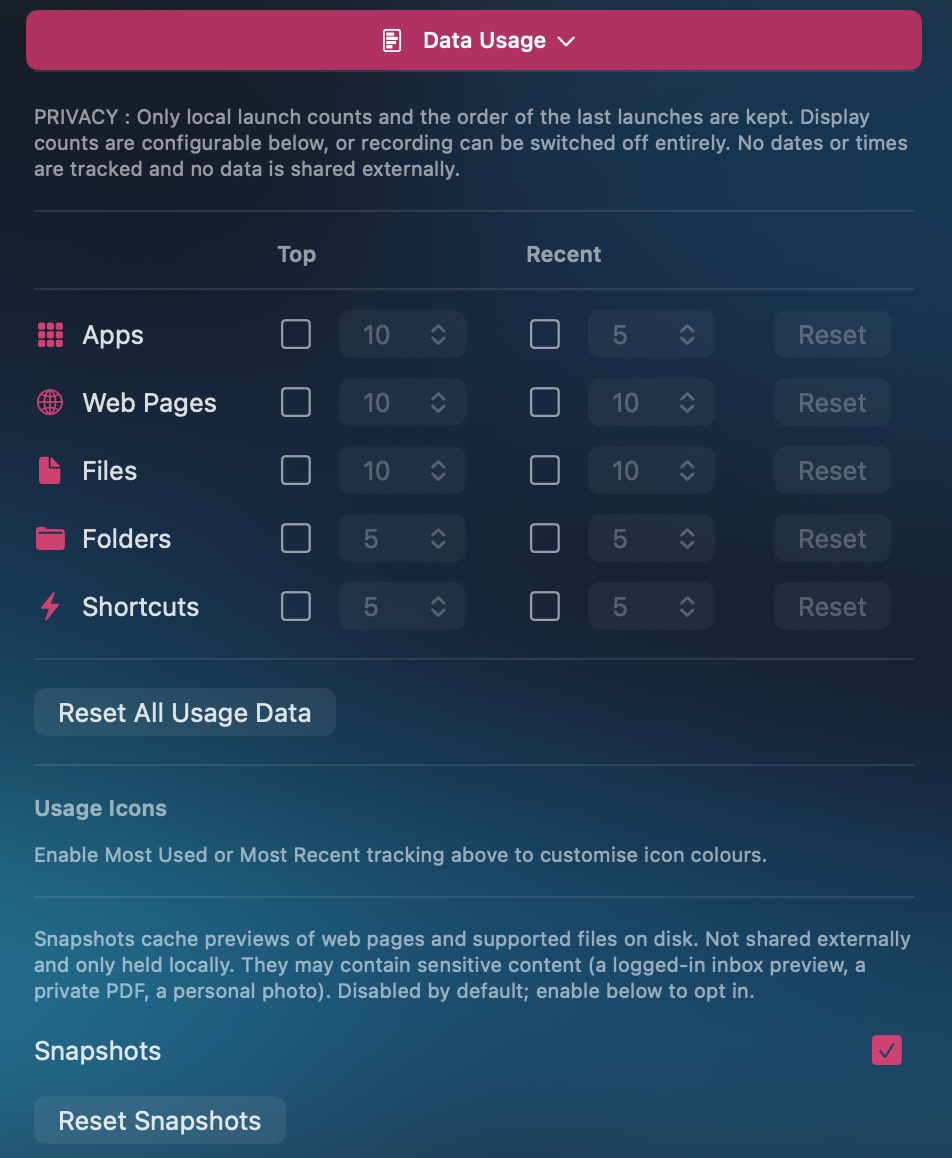
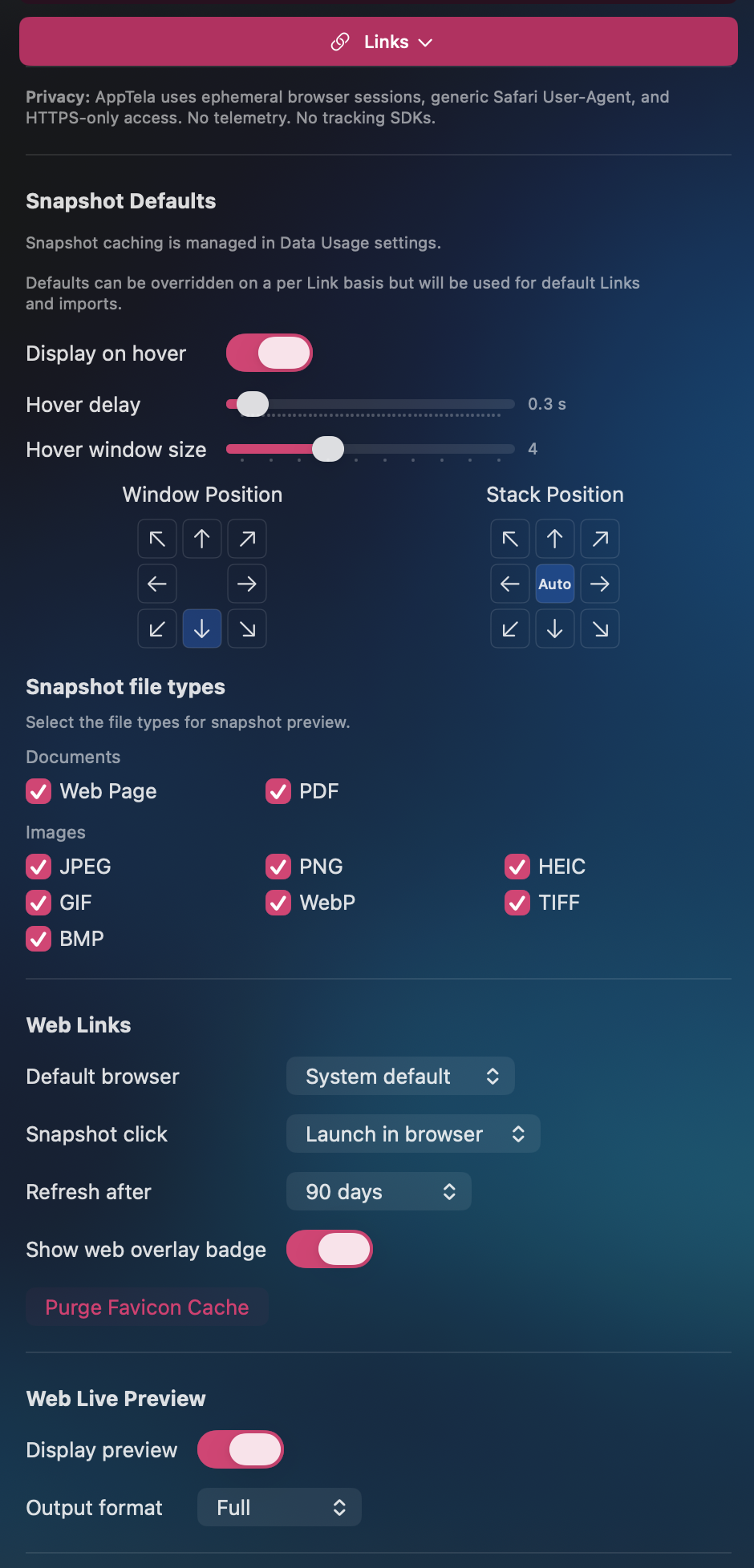
- Snapshot cache - small PNG/JPEG previews of fetched web pages, PDFs, and image files, used for hover popups. 150 MB LRU cap. Opt-in (default OFF).
- Favicon cache - site icons fetched per Web Link so tiles render. Versioned so stale entries auto-invalidate. Purgeable from Preferences › Links.
Your content
- Usage counters - Top, Recent, and Most Used buckets per item type (Apps, Web Pages, Files, Folders, Apple Shortcuts). Each type toggles independently. All default OFF.
- Notes and Labels - per-item plain-text notes and reusable style presets. Round-trip via .ANO export.
- Imported bookmarks - Safari bookmarks imported as Web Links inside AppTela's layout. The import itself is offline.
You can verify these controls in AppTela's Preferences. The Data Usage pane explicitly states what is kept and offers a Reset All button. Snapshots are gated by a master toggle right beside the privacy statement.
Network access AppTela uses
Every outbound request is HTTPS-only, sandboxed, and uses a generic Safari-shaped User-Agent. None of them carry any AppTela identifier, telemetry beacon, or analytics ride-along.
- 01 Favicon resolution User-initiated
- When you add a Web Link, AppTela fetches the site's favicon (
apple-touch-icon, declared<link rel="icon">, then/favicon.ico). HTTPS-only. - 02 Live Preview User-initiated
- When you click a hover snapshot or choose Live Preview, an embedded WKWebView opens the URL inside AppTela. Ephemeral
WKWebsiteDataStore- no persistent cookies, localStorage, or ServiceWorkers. - 03 Snapshot capture Opt-in
- Offscreen WKWebView captures page previews for hover popups. Master toggle in Preferences › Data Usage, default OFF. First-enable confirmation dialog.
- 04 Check for Updates Background
- Polls Apple's iTunes Lookup API once per 24 hours, fire-and-forget. "Allow Update Check" toggle in Main preferences, default ON.
- 05 Check Links Opt-in
- Optional HEAD reachability probe for Web Links. Runs only when you click "Check Links..." in Manage Library and tick "Include Web Links". 5-second timeout, ephemeral
URLSession, max 5 concurrent.
Data we do not collect
AppTela does not collect, transmit, or store any of your personal data on any server. The list below is what we explicitly do not do, even with v1.2.0's new local features:
- No analytics or usage tracking
- No automatic crash reports
- No third-party SDKs, ad networks, or trackers
- No advertising identifiers
- No location data
- No accounts, sign-in, or registration
- No cloud sync of your data
- No persistent cookies, localStorage, or ServiceWorkers in AppTela's browsing sessions
- No fingerprinting
- No transmission of notes, layouts, usage counters, snapshots, or favicons to anyone
Export and Import
AppTela includes Export and Import features that save and restore your full configuration to a local file on your Mac. The file remains on your device and is never transmitted to us or any third party. You control it entirely.
Import Data shows a two-step confirmation before any state is changed, and clears on-disk snapshot and favicon caches as part of the replace-all contract.
Erase All Data
Preferences › Advanced › Erase All Data wipes everything AppTela has ever written. After it runs, the app is in first-launch state. Your installed apps remain installed on your Mac.
What gets wiped:
- Snapshot cache and favicon cache
- Usage counters (Top / Recent / Most Used)
- Notes and Label presets
- Imported bookmarks and Web Links
- Layout (Screens, Categories, Groups, Stacks)
- Preferences (themes, behaviour toggles, Data Usage toggles)
- Message Center read and dismissed state
Support communications
If you contact us by email for support, we retain your correspondence to:
- Respond to your enquiry
- Improve our products and services
- Maintain records for quality and training purposes
Support emails are retained for up to three years unless you request deletion sooner. You can request deletion at any time by emailing support@apptela.com.
Third-party services
AppTela does not integrate with any third-party analytics platforms, advertising networks, or telemetry services. The app functions entirely offline apart from the five user-controlled HTTPS paths listed above.
AppTela is distributed via the Mac App Store. Apple's privacy practices apply to your App Store account and purchase. See Apple's Privacy Policy for details.
Optional online services
In the future we may introduce optional online features such as theme libraries or cloud sync. Any such feature will be opt-in, and we will update this Privacy Policy before any data leaves your Mac.
You will always be able to use AppTela fully offline without creating an account or sharing any data.
Your rights (GDPR / UK GDPR)
Because AppTela does not collect personal data, most data-subject rights do not apply to app usage. For support correspondence you have the right to:
- Request access to your data
- Request correction of inaccurate data
- Request deletion of your data
- Object to processing
- Data portability
To exercise these rights, contact us at support@apptela.com.
Children's privacy
AppTela does not collect data from anyone, including children. The app is rated 4+ and is suitable for all ages.
Changes to this policy
We may update this Privacy Policy from time to time. We will notify users of any material changes by updating the "Last updated" date at the top of this page and, where appropriate, by surfacing a notice in AppTela's in-app Message Center.
Contact
Email: support@apptela.com
Escape Code Limited
Registered in England and Wales